What is BPAY?


- BPAY lets you pay bills using a simple Biller Code and CRN, making it easy to send money directly from your bank account without handing over card details.
- Payments aren’t instant and transactions are typically processed in daily batches and settle the next business day.
- BPAY is evolving, with the BECS system set to be replaced by the NPP, meaning faster and more modern BPAY payments are likely on the way.
Paying a bill? Chances are, you’ll have the option to use BPAY - a system designed to make it simpler to transfer funds from your bank account to a service provider.
What is BPAY?
BPAY is a bill‑payment service that lets you pay businesses using two codes:
- a Biller Code identifying the organisation, and
- a Customer Reference Number (CRN) identifying your specific account or policy.
It’s been operating for nearly 30 years and is supported by more than 150 banks and financial institutions. Around 60,000 businesses offer it as a payment method, including councils, insurers, utilities and telcos. It also integrates with third‑party bill‑payment platforms like Sniip.
How does BPAY work?
BPAY is often presented as an option when it comes to paying bills. You’ve most likely seen the logo on your phone, internet, electricity, or gas bill. Even your local council rates will likely offer BPAY as a payment option.
To pay a bill via BPAY, log into your bank’s online portal or app and following these steps:
- Select ‘make a payment’, ‘transfer’, or the equivalent
- Choose the BPAY option
- Enter the Biller Code
- Enter your CRN
- Select the amount you wish to pay
- Confirm the payment and voila
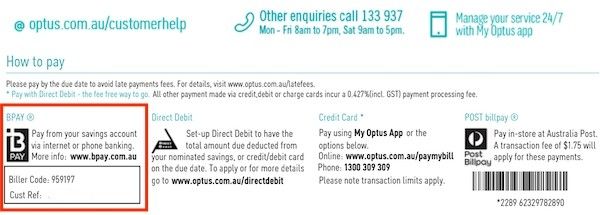
The biller code and customer reference number will be listed on the bill - generally at the bottom. Sometimes, your banking app or the billee may provide a QR code or another function allowing you to fill in BPAY details instantly.
BPAY: Behind the scenes
Although BPAY provides the bill‑payment network, the actual money moves through the Bulk Electronic Clearing System (BECS) - the direct entry system used for payroll and direct debits.
This means:
- Payments aren’t instant
- Banks process BPAY in daily batches
- Settlement occurs on the next business day
BPAY itself passes along the CRN and payment information so the biller can reconcile it automatically.
But BECS’ days are limited. The system is expected to be phased out by 2030 as Australia transitions fully to the New Payments Platform (NPP). Consumers won’t notice much difference, as BPAY is expected to evolve and operate on the NPP in future, offering faster settlement.
BPAY View
BPAY also offers a service called ‘View’. To put it simply, View sees bills delivered directly to your bank account, so they don’t get lost in your inbox or the mail.
Not all institutions offer this feature, so double check your bank account to make sure.
BPAY processing times
As long as you’re making your payment before 6pm Melbourne/Sydney time on a weekday, your payment will be treated as having been transferred the same day.
If you’re paying after-hours, on a weekend, or on a public holiday, your bill will be considered paid the following business day.
Thus, it’s important to plan your after-hours BPAY payments to ensure you don’t run late on any important bills - or any that charge late penalties.
BPAY compared to other payments options
When it comes to paying bills, there are a whole host of payment options, and frankly, BPAY comes out on top in a lot of scenarios.
Pros
- Often cheaper than other payment methods
Paying by credit card or via Australia Post frequently attracts fees, which BPAY avoids. - You’re in greater control
Unlike direct debit, the biller can’t pull money from your account. You choose when and how much to pay. - Strong reconciliation
The CRN system dramatically reduces misdirected payments or manual matching.
Cons
- Not instantaneous
Unlike the likes of PayID or Osko, BPAY transactions can take time if made outside of specific hours. - Not necessarily automatic
BPAY bill payments are not automatic unless they’re set up to be. - More limited recourse for refunds
Your bank can’t get a refund for a BPAY payment if a business doesn’t deliver. This is at odds with, say, credit card payments, after which the institution may go into bat for you. - Not accepted everywhere
Some merchants, especially retailers, don’t support BPAY.